Automate all your repetitive HR tasks and save yourself hours every week to focus on your most important work.
Book a demoWelcoming a new hire to your small business should be a happy moment, but it’s all too often plagued by tech that hasn’t arrived, late-signed contracts, and paperwork that’s made a disappearing act. This is the reality of relying on a paper-based onboarding process.
But there is a better alternative out there. Picture an employee’s first day that runs smoothly every time, because contracts, paperwork, pre-employment checks, and equipment orders were already taken care of digitally. Welcome to paperless onboarding.
In this guide, we’ll explain what paperless onboarding is, the real benefits for small businesses, and how to go from a manual system to a digital one with the help of a familiar tool.
Paperless onboarding replaces the traditional, manual process of welcoming new hires with a digital version that saves time and improves consistency. A paperless onboarding process typically includes digital forms, e-signatures, document submission and tracking, and an employee portal.
Switching from a manual to a digital process introduces major benefits for small businesses. Instead of relying on physical copies of forms and contracts, everything is online and can be accessed from anywhere — which is ideal for hybrid or remote onboarding.
The main benefits of paperless employee onboarding include:
"Every single person comes away and says 'wow, that's a really slick onboarding tool, that was so easy to use'."
— Eliot Brooks, Founder and CEO @ Thriva
Paperless onboarding makes sense for almost every business, and often the only hurdles are access to HR technology and lack of clarity on how to approach the process. Here’s a step-by-step guide on how to introduce paperless onboarding — including how our HR software, CharlieHR, can simplify the process.
Before you move any processes online, audit your existing setup. Map out every part of the onboarding flow, including:
Complete a full inventory of every document you issue, your onboarding steps, your approval workflows, and your induction checklist. It’s also a good idea to consult with any other individuals involved in onboarding — like the employee or contractor that handles IT and security.
Decide which steps are essential, which documents to keep, and where you can make improvements.
💭 CEO tip:
Don’t take this step for granted. More often than not, the mistakes we see are the most basic ones. Skip it now and regret it later is my motto, so do your due diligence, ensure everything gets signed, filled in, and don’t worry about it for later.
Once you know which documents form your onboarding process, it’s time to digitalise them. Turn existing documents into templates, final-version documents, and fillable forms that you can send and receive through your HR software.
Examples of documents to digitalise include:
With all these documents in one place, you can make sure new employees receive access to all the information they need — without sending multiple emails with separate PDFs, Google Docs, or links.
Digital forms are an improvement compared to a traditional paper onboarding process, but being able to sign contracts online is a gamechanger. Instead of asking employees to print and send back documents, they can read the contract and sign at the same time.
Most small business HR systems don’t include an e-signature tool, meaning you need to use separate software or find one that integrates with your chosen HRIS. This can be a real barrier for small teams that want access to the practical and time-saving benefits of e-signatures.
Luckily, CharlieHR includes e-signatures. Instead of using yet another tool, you can send and receive signed documents directly within your HR system.
CharlieHR customers can use the e-signatures feature to:
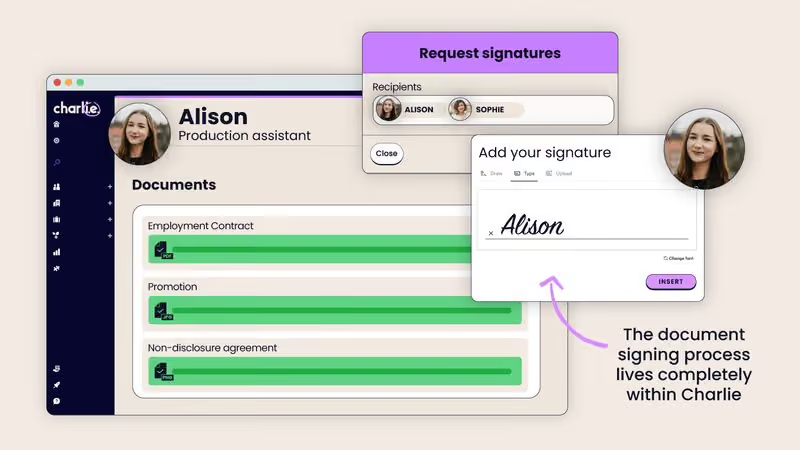
Digital forms, documents, and e-signatures are part of onboarding, but for the workflow to really be effective you need a way to tie everything together. Signed documents should land in your employee database, not a separate drive or someone’s inbox.
A connected onboarding flow includes:
Using an HR platform that includes an employee onboarding software like Charlie means you can take care of the entire process from one place — plus use automated workflows, notifications, task assignments, checklists, and an employee portal to improve efficiency and create a more rewarding experience for new hires.
Run a rest project before you roll out the finished onboarding workflow. This is an opportunity to identify any major issues with your steps, documents, e-signatures, or automations. It’s also a chance to get feedback from your new hire and improve the process.
Use the pilot run to check for:
Feedback from your newest hire is the most valuable part of this stage. They’ll be able to share their honest opinions on whether the new process works or not, and offer real insight into where you need to make changes.
💭 CEO tip:
A lot can feel like a waste of time when you’re starting out or building something build. Come back to this. Iterate. Listen to people. And also get someone to own it. It doesn’t need to be you, that’s why Charlie acts like the first HR hire, because no one needs an HR degree to run things. If you’re really starting out, I recommend checking out this guide on how to onboard your first hire.
Introducing paperless onboarding is a win by itself, but these tips will take your workflow from average to a significant improvement:
The benefits of a digital onboarding process outweigh the initial time and cost challenges for most small businesses — even more so if you choose affordable software like CharlieHR.
CharlieHR makes it possible for founders and managing directors to take care of core HR (including onboarding) from one place, without needing to make an HR hire. Paperless onboarding, including native e-signatures, is easy to introduce with Charlie.
Key reasons why small businesses choose CharlieHR include:
Yes, paperless onboarding is a legally compliant way to handle pre-employment checks, employment contracts, tax declarations, and employee data collection and storage. Small businesses can confidently switch to a paperless version of their onboarding process. Some people use tools like Trello or Notion for their onboarding, but the security and automation can be lacking.
Paperless onboarding refers to a digital version of a traditional, paper-based onboarding process. Onboarding software is a specific type of HR tool that allows HR teams to automate the onboarding experience. Most teams use onboarding software (or the onboarding feature within their HRIS) to handle paperless onboarding, but it’s also possible to go paperless using your own DIY system.
While you don’t need special software, it’s highly recommended. Using tools like Google Docs or Dropbox means your employee data and docs are stored elsewhere — best practice for onboarding advises keeping all your HR data in a central system of record, like your HRIS. This makes it easier to store and safeguard data, as well as take advantage of automated onboarding workflows and e-signatures — if your software offers it.
Yes, documents can be signed before an employee’s start date. They must be provided on the first day of employment, but it’s also acceptable to provide them beforehand. It often makes sense to provide documents in advance of the first day to avoid any unnecessary delays.
Yes, an e-signature is legally binding for employment contracts in the UK (as provided for in the electronic execution of documents guidance). Business owners can confidently switch to using a suitable e-signature tool for employment contracts and other employment forms.