

Learn how to cut HR admin
Get any question answered
Zero commitment


When you’re running a small business and wearing five different hats, onboarding a new employee can feel like a race against the clock, leaving you scrambling to get contracts signed, laptops ordered, and HMRC notified, all while trying to make sure your new starter doesn't spend their first day staring at a blank screen.
A structured onboarding checklist turns a fragmented "to-do list" into a repeatable, efficient process that prevents compliance gaps and ensures a consistent experience for every new employee. The checklist tracks every legal, administrative, and cultural task required to integrate a new hire, while segmenting the entire onboarding process into a clear timeline with ownership assigned to each task.
At Charlie, we know that in a team of 30 or fewer, the person running onboarding is rarely an HR specialist. They’re usually the person keeping the rest of the business moving while balancing the weight of compliance requirements and employee retention goals with documentation and physical setup.
To help, we’ve put together an onboarding checklist and customizable template to help you streamline employee onboarding and build an efficient, professional process for your new hires.
An onboarding checklist is a clear, organised list your team uses to manage a new hire’s setup from start to finish. It keeps onboarding tasks visible across contracts, payroll, compliance requirements, access, and induction so each step has a place and a clear owner.
Without a checklist, onboarding quickly becomes inconsistent and may lead to gaps in compliance, as well as a poor experience for your new starter.
ℹ️ Eighty percent of workers say they would stay in a role longer if the onboarding process was better, according to Insight Global’s 2025 Employee Sentiment Report.
When onboarding goes wrong, even a small error or missing document can create bigger problems. Missed legal steps can create risk for the business, and a poor first experience can make it harder to retain good people.

Small business tip:
Onboarding matters! Especially for small businesses — the first few months determine whether someone will stay at a company, and hiring new people costs money. Smooth, professional and consistent onboarding gives new employees the best possible impression, as well as the best possible start. So it makes good business sense to get it right.
Yas Lord-Pottinger, People & Talent Lead @ Charlie
At Charlie, we understand the pressure to retain employees and make new hires feel welcome from the start. We’ve learned that a unified, structured onboarding checklist can help your business make a stronger first impression and give people what they need to settle in with confidence.
The onboarding checklist below is broken into four phases so you can track what needs to happen before day one, on day one, in the first week, and over the first 90 days. We’ve specifically designed it for small businesses that prefer to use manual checklists instead of templates or automation.
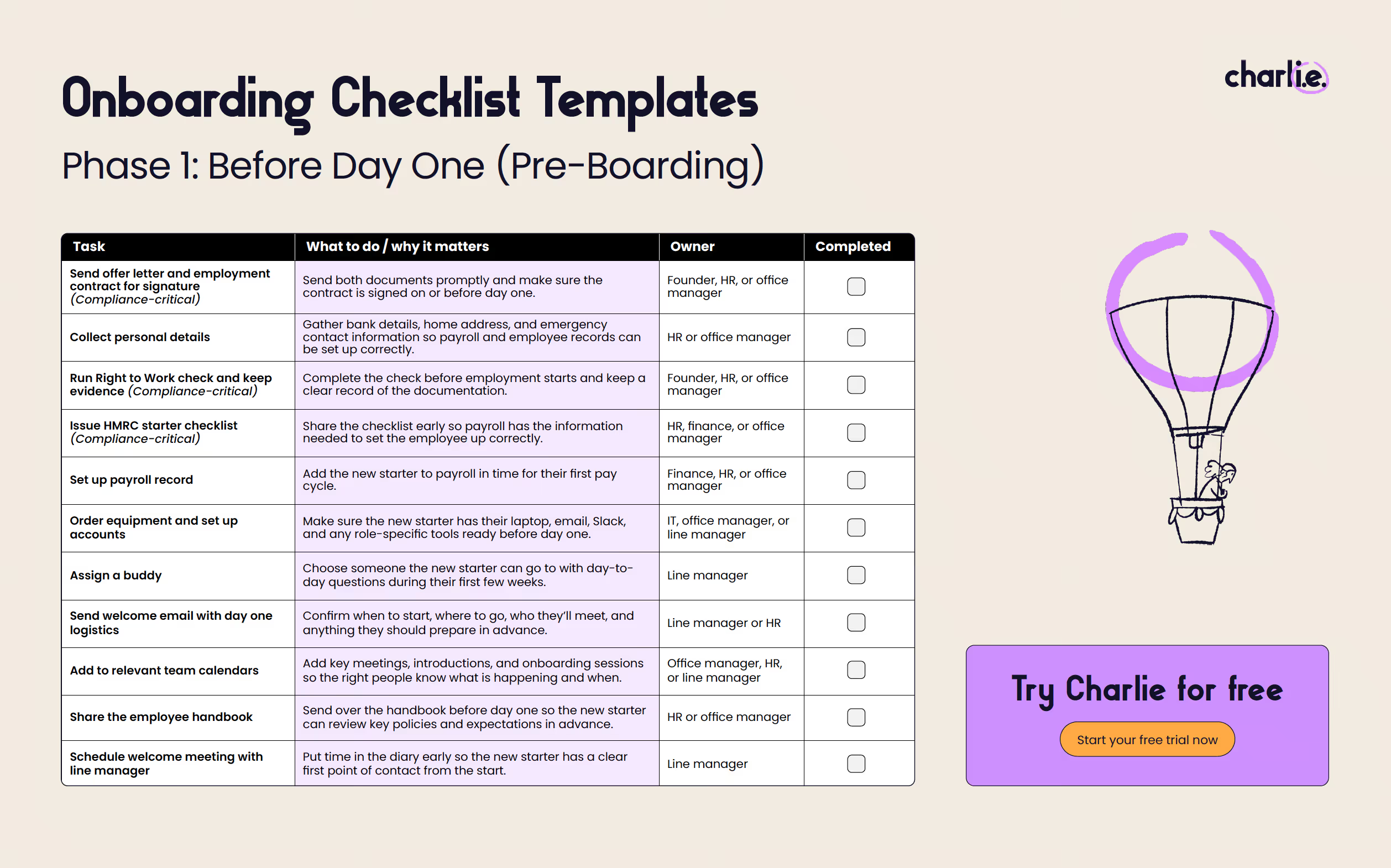
Task
What to do /
why it matters
Owner
Completed
Send offer letter and employment contract for signature
(Compliance-critical)
Send both documents promptly and make sure the contract is signed on or before day one.
Founder, HR, or office manager
Collect personal details
Gather bank details, home address, and emergency contact information so payroll and employee records can be set up correctly.
HR or office manager
Run Right to Work check and keep evidence
(Compliance-critical)
Complete the check before employment starts and keep a clear record of the documentation.
Founder, HR, or office manager
Issue HMRC starter checklist
(Compliance-critical)
Share the checklist early so payroll has the information needed to set the employee up correctly.
HR, finance, or office manager
Set up payroll record
Add the new starter to payroll in time for their first pay cycle.
Finance, HR, or office manager
Order equipment and set up accounts
Make sure the new starter has their laptop, email, Slack, and any role-specific tools ready before day one.
IT, office manager, or line manager
Assign a buddy
Choose someone the new starter can go to with day-to-day questions during their first few weeks.
Line manager
Send welcome email with day one logistics
Confirm when to start, where to go, who they’ll meet, and anything they should prepare in advance.
Line manager or HR
Add to relevant team calendars
Add key meetings, introductions, and onboarding sessions so the right people know what is happening and when.
Office manager, HR, or line manager
Share the employee handbook
Send over the handbook before day one so the new starter can review key policies and expectations in advance.
HR or office manager
Schedule welcome meeting with line manager
Put time in the diary early so the new starter has a clear first point of contact from the start.
Line manager
Once the essentials are in place before day one, your focus shifts to helping the new employee get off to a strong start, with clarity and confidence.
Task
What to do /
why it matters
Owner
Completed
Health and safety induction
(Compliance-critical)
Go through key health and safety information so the employee understands the procedures relevant to their role and workplace.
HR, office manager, or line manager
Data protection and GDPR briefing
(Compliance-critical)
Explain how to handle employee, customer, or business data properly from the start.
HR, line manager, or IT
Verify all compliance documents
(Compliance-critical)
HR, office manager, or line manager
Office or workplace tour, or virtual equivalent
Show the new starter around the workspace, or give them a virtual equivalent, so they know where things are and how the day-to-day setup works.
Line manager or office manager
IT setup walkthrough
Help the new starter log in, access key systems, and troubleshoot any setup issues on day one.
IT or line manager
Introduction to the team
Introduce the new starter to the people they’ll be working with so they know who’s who from the start.
Line manager
Review the first week schedule
Walk through meetings, training, and priorities for the week ahead so expectations are clear.
Line manager
Confirm probation period details
Explain how long the probation period lasts, how it will be reviewed, and what support the new starter can expect during that time.
Line manager or HR
After the first day, the goal is to build momentum and make sure your new hire has the support and access they need.
Task
What to do /
why it matters
Owner
Completed
Review the role and set initial goals
Go over the new starter’s responsibilities, priorities, and short-term goals so they know what success looks like early on.
Line manager
Introduce key stakeholders
Make sure the new starter meets the people they’ll work with regularly across the business.
Line manager
Confirm access to all required systems
Check that the new starter can access every system, tool, and document they need to do their job properly.
IT or line manager
Hold the first 1:1 with the line manager
Use the first 1:1 to answer questions, check how the first few days have gone, and spot any early blockers.
Line manager
Schedule any role-specific training
Set up any training the new starter needs for their role so learning doesn’t get pushed back once the week gets busy.
Line manager or HR
The final phase of your onboarding checklist helps you turn a good start into a more settled, consistent onboarding experience.
Task
What to do /
why it matters
Owner
Completed
Hold a 30-day check-in
Ask how the new starter is settling in, what’s going well, and whether anything is getting in the way early on.
Line manager
Run a 60-day review
Review role clarity, progress, and team integration so you can address any gaps before they become bigger problems.
Line manager
Complete the 90-day probation review
Use the probation review to assess performance, confirm next steps, and set clear objectives going forward.
Line manager or HR
Confirm ongoing development plans
Agree on the support, training, or goals that will help the employee keep growing after onboarding ends.
Line manager
For small UK businesses, onboarding compliance doesn’t need to be complicated, but a few tasks do need to happen at the right time. The main priorities are right to work checks, employment particulars, payroll setup, health and safety, and data protection.
UK onboarding compliance task
When
Action
Completed
Right to work documentation
Before employment starts
Complete the check and keep evidence of it. A member of the team must see this documentation to confirm Right to Work checks have been done.
Employment contract signed
On or before day one
Make sure the employee has signed their contract or received their written terms.
HMRC starter checklist
Before the first payroll run
Collect this form so the employee can be set up correctly for payroll.
Health and safety induction
Day one
Cover the health and safety information relevant to their role and workplace.
GDPR/data protection briefing
Day one
Explain how employee and company data should be handled.
⚠️ Anything affecting someone’s right to work, pay, safety, or personal data should be handled before day one or as close to it as possible.
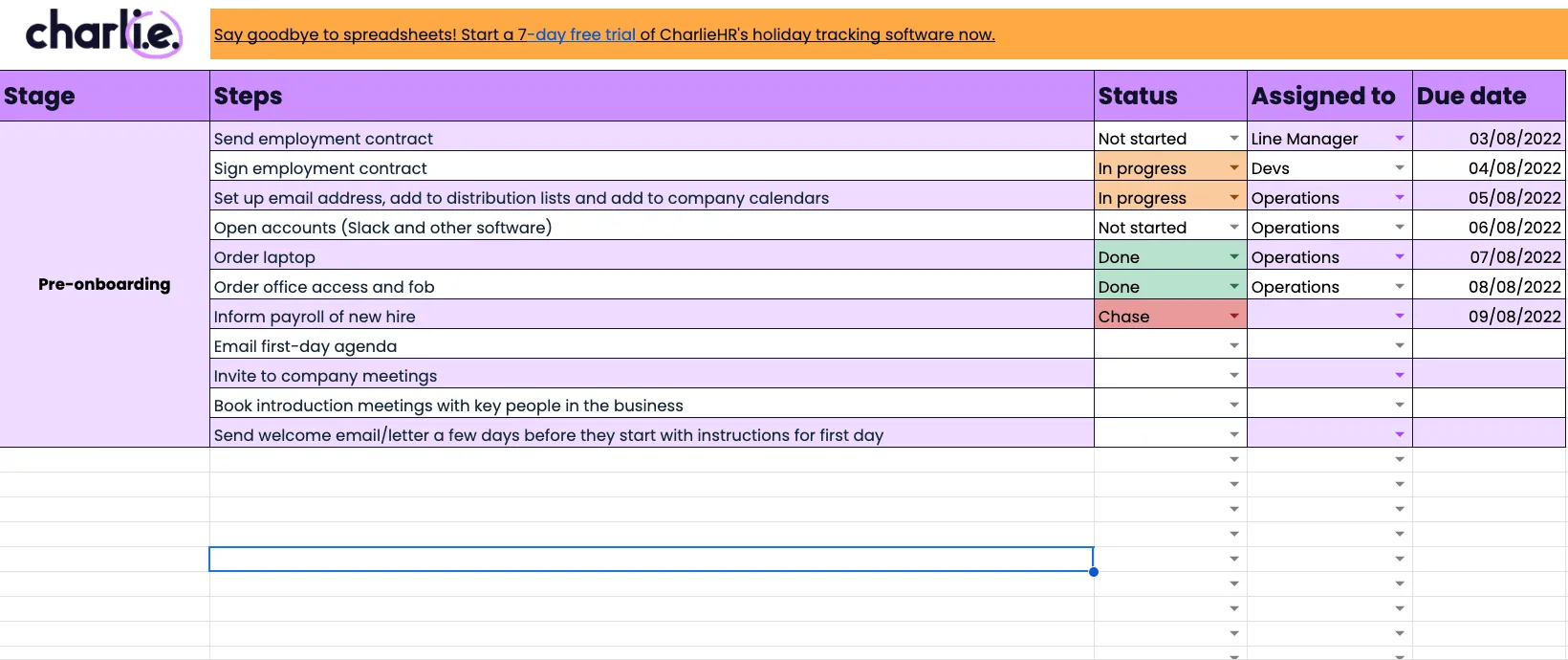
An onboarding checklist template built with Excel or Google Sheets gives you more flexibility than a fixed PDF. While the PDF version limits the amount of detail you can include, a template provides space for more data, such as owner, due date, status, and notes.
An effective onboarding checklist should cover:
Once you have that structure in place, you can tailor the template to the role and your company. You might add software access, internal guides, role-specific training, or something simple like a welcome coffee.
At Charlie, we understand that onboarding is rarely handled by one person. Your contracts and compliance might sit with HR or an office manager, IT might handle equipment and accounts, the line manager might lead day one and first-week check-ins, and finance might set up payroll.
A customised template helps you keep all of these details in one place.
You can use our free onboarding checklist template below as a starting point, then adapt it to suit your team and workflow.
Here’s how to get started customising a checklist template for your company:
Small business tip:
Ditch the spreadsheets! Tired of wading through multiple spreadsheets for everything from your employee onboarding checklist to your holiday leave tracker? With onboarding software for small businesses like CharlieHR software like Charlie, everything’s in one place. Charlie automates all of the tasks in the new employee checklist and securely stores the onboarding documents, so there’s zero faff. And the system automatically sends out reminders so you never have to chase.
Yas Lord-Pottinger, People & Talent Lead @ Charlie
For a very small team, manual checklists and templates may work well in the beginning. As your team grows, manual tracking becomes less efficient and you’ll require a more thorough onboarding process that includes checklist automation.
Automation doesn’t remove the human side of onboarding. Instead, it clears some of the admin so your team has more time for the parts that matter most, like welcoming a new starter, answering questions, and helping them settle in.
Automation turns a fixed or static checklist into a live one that helps keep onboarding on track. Instead of relying on someone to keep checking what’s done, what’s due, and who still needs to act, the process stays visible and easier to manage across the team.
Manual checklist vs. live checklist
Manual checklist
Live checklist
Lists the tasks
Assigns tasks to the right people
Shows what should happen
Shows what’s done and what’s still outstanding
Sits in one document
Keeps the process moving in one shared workflow
Needs manual follow-up
Sends reminders automatically
Goes out of date easily
Updates as the process moves forward
Helps you record onboarding
Helps you run onboarding
Check out our guides comparing automated vs manual with Trello vs onboarding software and Notion vs onboarding software.
Charlie’s onboarding checklists are built to help small businesses move their onboarding tasks out of a scattered workflow and into one unified source that takes care of much of the work for you.
Instead of relying on spreadsheets, email threads, and manual follow-up, you can manage onboarding in one shared place that keeps everything moving.
Charlie lets your team see what’s been assigned, what’s due, and what still needs attention. New hires can also submit key details themselves, which cuts down on data entry and gives managers less to chase.
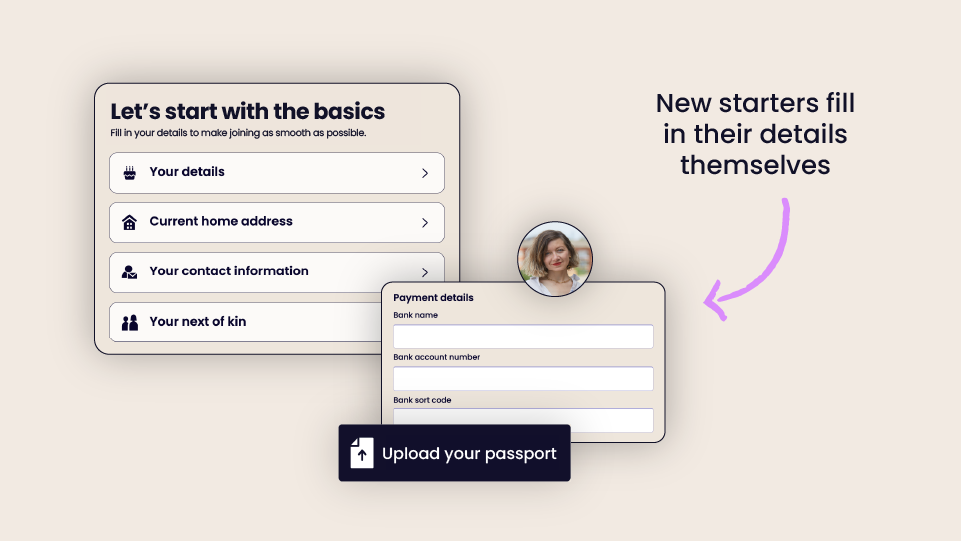
Tasks, documents, deadlines, and employee information stay together, so compliance and documentation are easier to manage and less likely to become lost or forgotten.
 Read case study
Charlie lets you assign tasks to the right people across your entire team, so success doesn’t rely on one person holding it all together. With reminders and progress tracking built in, onboarding can keep moving without constant checking in.
At Charlie, we’ve seen that consistency is one of the biggest benefits for growing teams. A clear, automated process built around onboarding best practices helps make sure every new starter gets the same level of support and follow-through.
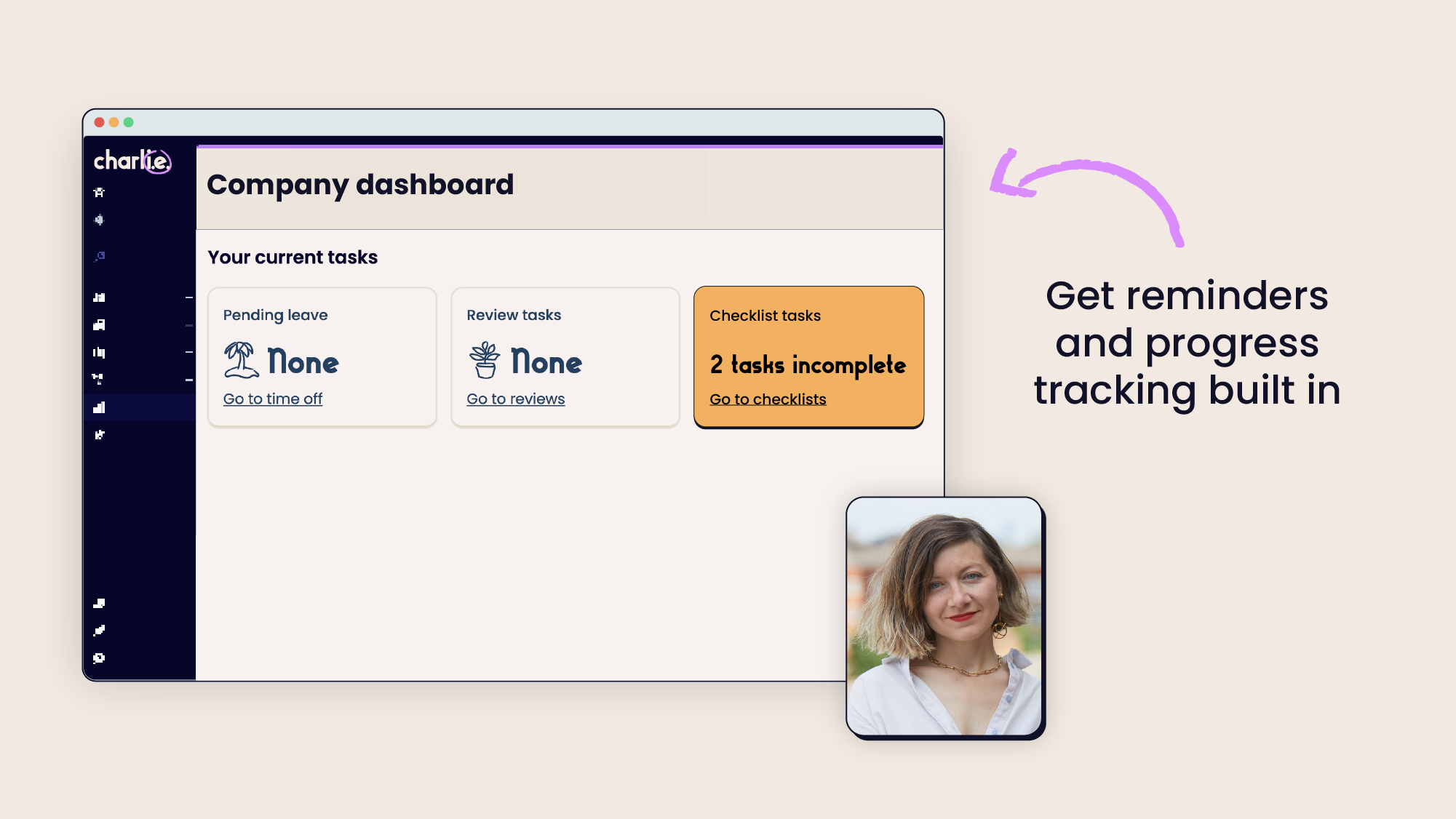
When your onboarding checklist connects with the rest of your hiring setup, there’s less copying between systems, fewer gaps in your records, and less time spent updating the same information in multiple places.
 Read case study
At Charlie, we know that in small businesses, the person responsible for the onboarding process isn’t always a human resource specialist. Automated onboarding checklists allow you to provide a professional onboarding experience from pre-boarding through the first 90 days of employment. When document requests, e-signature prompts, and reminders are handled for you, there’s more time to welcome new employees and provide clear guidance and early support.
Learn how to cut HR admin
Get any question answered
Zero commitment

A comprehensive UK checklist must cover four key areas: Compliance (Right to Work checks and contracts), Logistics (payroll setup and IT access), Introduction (team meetings and buddy systems), and Training (Health & Safety and role-specific goals). For small businesses, the goal is to balance these "must-have" admin tasks with a warm cultural welcome.
With Charlie’s tools, the setup side of onboarding can often be completed in less than a week, but the live checklist can continue supporting a new starter through their first 90 days.
Yes. Most small businesses start with a manual template to formalise their process. You can download our free Onboarding Checklist PDF or Onboarding Checklist Template which is specifically designed for UK small businesses. It maps out every task from the moment a candidate signs their offer letter through to their 90-day review.
For teams under 49 people, you can automate your checklist by moving from a static document (like Word or Excel) to a dedicated HR tool like Charlie. This allows you to set automatic task assignments and reminder nudges, which means your accountant is automatically notified about payroll, and your managers are reminded to book welcome coffees, without you having to manually chase them down.
An new employee induction is a short-term event—usually the first day or week of a person’s employment—focused on immediate essentials like health and safety, office tours, and signing contracts. Onboarding is the broader, months-long process of integrating a new hire into your culture and performance goals.
Think of induction as a single line item on your larger onboarding checklist. Induction gets them through the door, but onboarding gets them settled and productive.
Employee onboarding is the process of helping a new hire join your team and get up to speed. Effective onboarding for small businesses covers more than contracts and payroll. It also includes introductions, training, tools, support, and clear next steps so the new starter can settle in and start contributing well. If you’re running a hybrid or remote business, you can also check our guide on remote onboarding.