

Learn how to cut HR admin
Get any questions answered
Zero commitment

CharlieHR and Sage HR are both designed for businesses in the UK. Charlie is an all-in-one platform with transparent pricing and all features included, while Sage HR takes a more modular approach. Which is best for UK small businesses?
In this guide we’ll explore and compare Charlie and Sage HR’s features, highlights, pricing, and why you should choose one HR software over the other.
Keep reading for a comparison of features and pricing, along with notes on the benefits of both HR platforms.
CharlieHR
SageHR
Docs and employee data
✅
✅
Compliance with UK laws
✅
✅
Onboarding
✅
✅
Time-off management
✅
✅
Performance reviews
✅
☑️ (with Performance add-on)
Employee surveys and polls
✅
☑️ (with Performance add-on)
Peer-to-peer shoutouts
✅
☑️ (with Performance add-on)
Perks and discounts
✅
❌
Report templates
✅
✅
Custom reports
✅
✅
Employee self-service
✅
✅
Integrations (including payroll)
✅
✅
Marketplace with exclusive discounts
✅
❌
Applicant tracking system (ATS)
☑️ (with Charlie Recruit add-on)
☑️ (with Recruitment add-on)
Bespoke HR advice
☑️ (with Charlie Grow add-on)
☑️ (with Sage HR advice service)
UK-based support
✅
✅
Designed for UK small businesses
✅
✅
Easy to set up
✅
✅
Best for:
First-time HR users and UK small businesses
Small to medium-sized businesses
Key:
We’ve created this guide with the help of experts and reviews from people who have used Charlie or Sage HR (or both). Contributors to this CharlieHR vs. Sage HR comparison guide include:
By seeking insights from a variety of people, we’ve made sure this guide is as useful (and transparent) as possible. For even more insights, check out our Sage HR alternatives or compare Charlie to other HR platforms.
Get to know the essentials and both platforms’ core strengths.
Charlie is an all-in-one HR platform designed for UK small businesses that want a clear, simple way to take care of HR tasks. It’s ideal for first-time HR software users or people that are juggling multiple roles.
Here’s where Charlie stands out:
Sage HR also helps teams take care of everyday HR tasks, with features like a centralised dashboard, document management, and onboarding. It’s also part of the Sage ecosystem, which makes it a good choice for anyone that already uses their payroll or accounting tools.
Here’s where Sage HR stands out:
Charlie was built for UK small businesses, with features and pricing to match. Businesses should choose Charlie HR if they’re looking for an easy-to-use small business HR software to streamline admin, support growth, and stay compliant.
Charlie’s time-to-implement is very low, with most businesses being ready to go within 7 days—much faster than many other HR software tools which can take months. Sign up when you’re ready, then import your data and start using Charlie to its fullest.
Charlie users can enjoy:
👉 Sage HR’s implementation times aren’t published online, but users can import their own data to the platform.
While Charlie and Sage HR are both suitable for small businesses, Charlie is more intentionally designed for your needs. Charlie brings together all the features that UK small businesses need, as well as extras that help you create a better employee experience — like perks and performance development.
Charlie users benefit from:
With everything in one place, small businesses can fix their fragmented HR stack and enjoy the benefits of seamless data flow.
👉 Sage HR also offers a range of HR features, but they’re not all included as standard — many are available only through optional add-ons (including performance reviews and surveys).
Charlie is great for first-time HR software users with no HR experience as it’s very easy to use, with all the features you need and none of the distractions or complexities that you don’t.
Charlie users experience:
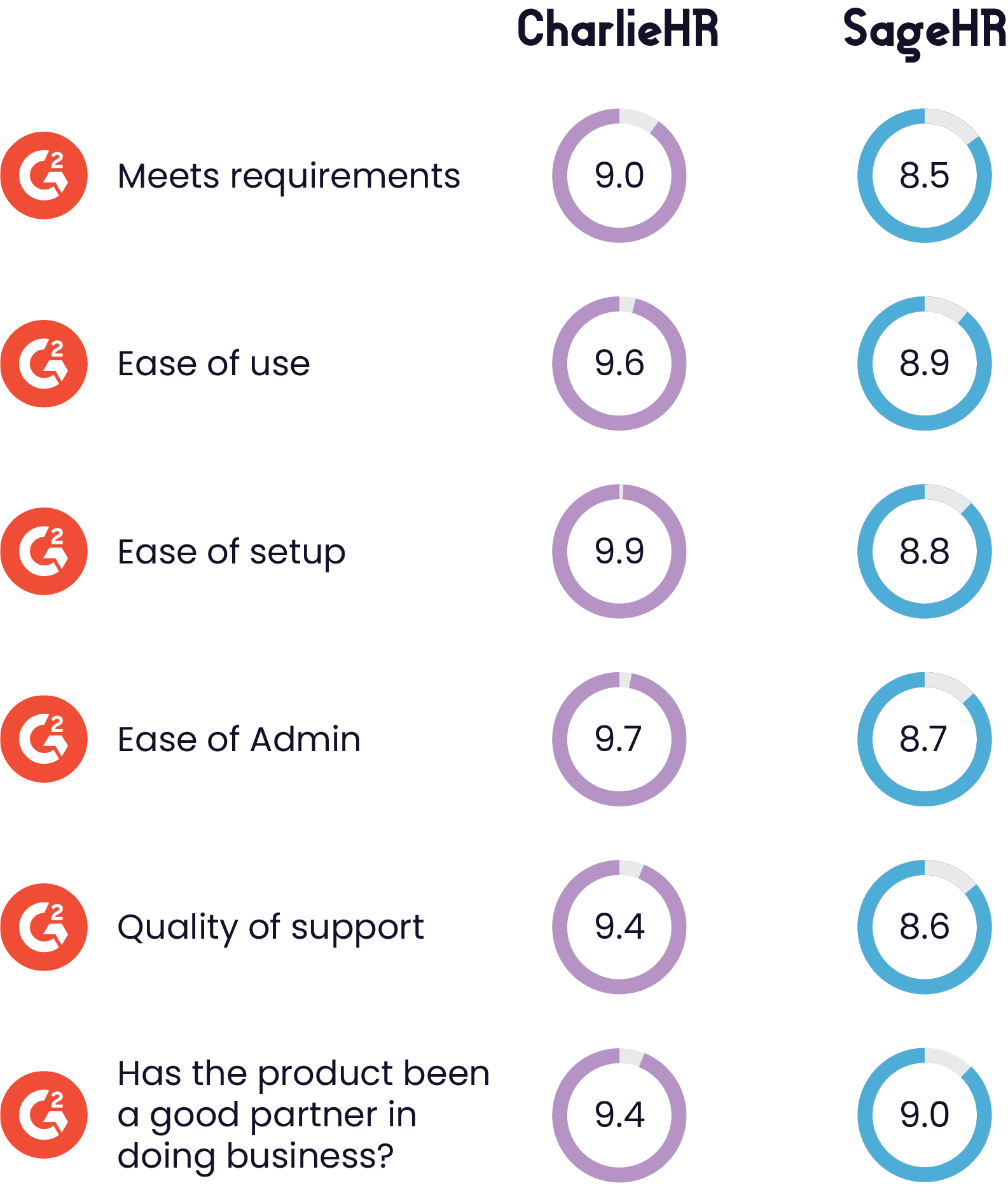
👉 Sage HR is also reportedly easy to use, with a rating of 8.9 for ease of use on G2. Charlie scores 9.6 for ease of use.
Charlie HR is affordable for small businesses, and the pricing is always transparent. Teams can see exactly what they’re paying for and there are no hidden costs or setup fees.
Charlie customers benefit from:
👉 Sage HR’s core HR and leave management pricing is also affordable for small to medium-sized businesses, but it’s priced per employee. There are no hidden costs with either platform.
Charlie is ideal for small businesses, but there are some situations where you might consider Sage HR instead. Sage HR is a great choice for medium-sized businesses, companies with shift workers, and those that already use other Sage software products.
Teams that choose Sage HR as their HR Information System (HRIS) can easily integrate it with other Sage products, allowing for automatic data syncing and reduced admin.
Sage HR can be combined with other software, including:
👉 Charlie is a standalone all-in-one HR platform, but you can easily connect it with your existing software through a range of integrations.
Sage HR’s core HR and leave management plan covers the basics, but users can customise their experience with optional add-ons. This flexibility is great for businesses that want to explore performance management or recruitment, or that need built-in time tracking tools.
Sage HR’s optional add-ons include:
👉 Charlie’s pricing plan includes all core features, with optional add-ons like Charlie Recruit and Charlie Grow available for when you grow.
Sage HR’s optional timesheets and shift scheduling features make it an attractive option for businesses that work in shifts or rotas, like those in hospitality, retail, and care. Teams can add this functionality to their existing plan, instead of using a separate tool.
SageHR users can benefit from:
👉 Charlie doesn’t have built-in timesheets and shift scheduling, but you can use the Papershift integration to seamlessly sync data.
Teams that work remotely or on-site will benefit from Sage HR’s mobile app, which allows managers and employees to submit requests and make changes on the move.
Sage HR’s mobile app allows users to:
👉 Charlie doesn’t have a mobile app, but the website is optimised for mobile devices.
CharlieHR and Sage HR both have promising features for small UK businesses, but how do they compare on price?
All prices are per month.
CharlieHR
SageHR
1-4 team members
Basic: £5*
With recruitment add-on: £60
Core HR + performance add-on: £8.28 - £33.12
With recruitment add-on: £212.28 - £237.12
5-9 team members
Basic: £47
With recruitment add-on: £102
Core HR + performance add-on: £41.40 - £74.52
With recruitment add-on: £245.40 - £278.52
10-14 team members
Basic: £47
With recruitment add-on: £102
Core HR + performance add-on: £82.80 - £115.92
With recruitment add-on: £286.80 - £319.92
15-29 team members
Basic: £108
With recruitment add-on: £193
Core HR + performance add-on: £142.20 - £240.12
With recruitment add-on: £328.20 - £444.12
30-49 team members
Basic: £185
With recruitment add-on: £270
Core HR + performance add-on: £248.40 - £405.72
With recruitment add-on: £452.40 - £609.72
50-99 team members
Basic: £323
With recruitment add-on: £423
Core HR + performance add-on: £414 - £819.72
With recruitment add-on: £618 - £1,023.72
*For the first six months. £21 thereafter.
Small teams can enjoy a special discount to save money with Charlie. Teams with between 1-4 people benefit from the “HR for a fiver” plan where they get access to all features for just £5 per month.
👉 Users would pay between £8.28 and £33.12 per month for a similar plan with Sage HR.
Sage HR and Charlie can both support you more as you grow, but which is best for scaling small businesses?
Charlie is ideal for small businesses with no HR system, as it gives teams all the basics they need for core HR and more. When it’s time to add recruitment functionality or get expert advice, Charlie users can do this without having to switch to another HR platform.
When it’s time to grow, Charlie can support that with:
Best for: Small businesses with no HR system that want to be able to grow without switching software.
 Read case study
Sage HR is a great fit for growing or more established businesses, especially ones that already use Sage for payroll or accounting. Growth for these businesses involves customising their plan with extra modules, or using Sage’s integration library to sync data with other tools in their HR stack.
Sage HR’s growth options include:
Best for: Small to medium-sized businesses that already have HR in place and want to move everything into the Sage software ecosystem.
Daye’s goal is to raise the standards in gynae health through innovative products and services in gynae and hormonal health. The company has grown significantly since 2018, and founder Valentina Milanova realised early on that she’d need a way to manage HR effectively.
Company size: 42 people
Goal with Charlie: To centralise HR tasks and optimise time spent on HR as they scale.
How Charlie helps Daye achieve their goal:
Daye also uses Charlie Grow for HR advice, which helped with:
Where they are now:
 Read case study
👉 To see how Sage HR supports teams to grow, visit Sage’s success stories hub.
Both platforms are suitable for small businesses, but Charlie feels like the best HRIS system for this group thanks to its intentional design, user-friendly experience, and value for money.
Charlie’s key highlights for small businesses:
Read case study
Switching from Sage HR to CharlieHR is easy. Sign up for an account with Charlie to get started. Next, export your data from Sage HR then follow the simple process to import data to Charlie.
It doesn’t take long to get started with CharlieHR. On average, businesses are up-and-running within 7 days. This is much faster than more traditional HRIS software, which can take weeks-to-months to implement.
Absolutely! You can migrate your data from Sage HR by downloading your data from Sage HR, then adding all your data to Charlie.
Not at all. You won’t need an HR expert to set up CharlieHR or Sage HR, as you can use a self-serve onboarding process with either HR software.
Charlie’s core HR features include employee data management, leave management, onboarding, compliance, reporting, and employee self-service access. Charlie also offers performance management, perks, and employee engagement within the same platform.
Yes, as a software tool designed for UK businesses, Sage HR covers UK employment law requirements including tracking employee leave and holidays and storing employee data securely.
Sage HR and Charlie HR both offer self-service HR software, and which one is better depends on your needs. For teams that work in shifts or rotas, Sage HR’s mobile app makes it the best option. For desk-based teams, Charlie offers managers and employees access to more features in one place.
No, both platforms do not offer mobile apps and payroll integration. Charlie has no mobile app or native payroll, but you can use payroll integrations to create a seamless link. Sage HR has a dedicated mobile app and can be connected to Sage 50 payroll.
There are a number of UK companies that have successfully used CharlieHR, including Bloom & Wild, GoSquared, Daye, Patch, and The School of Life.
We’ve spoken to teams that have previously used Sage HR and either considered or did switch to CharlieHR. Their feedback has been that Sage HR felt “clunky” and awkward to use, and that they often started with Sage HR as they already used Sage for payroll or accounting.
According to G2 user ratings, HR teams rate CharlieHR 9.6 for ease of use and 9.4 for quality of support. Sage HR scores 8.9 and 8.6 respectively.
The best way to see a real example of CharlieHR’s setup and results is to book a demo with our sales team. They’ll walk you through the platform and explain the features. Our customer stories section showcases some of our best results for small businesses.


Learn how to cut HR admin
Get any questions answered
Zero commitment