
Performance management and performance reviews
DIY solutions vs HR software
Book a demo✅ Learn how to cut HR admin
✅ Get any questions answered
✅ Zero commitment

Introduction
What DIY solutions are available for performance reviews?
Pros and cons of DIY solutions for performance reviews
What about HR software for performance reviews?
Is HR software like Charlie right for small businesses?
DIY solution vs HR software: how to choose?
Spreadsheets vs HR software FAQs
Looking for solutions to new problems is a rite of passage for a startup small business.
Sometimes the answer is staring you right in the face, but more often than not you’ll end up down a rabbit hole following one link after another, trying to figure out which review is genuine and whose opinion you can trust.
It’s a bit of a nightmare!
Performance management is one of those things you don’t typically think about until you have to. But by then, you’ve got employees, deadlines, customers, and very little time — and you needed a solution yesterday. We get it, because we’ve been there.
To save you the headaches, this guide compares the best DIY solutions for performance management with HR software, and lists out everything you need to make an informed decision for you and your team.
Keep reading if you know you need performance reviews, but simply have no idea where to start...
What DIY solutions are available for performance reviews?
If you’re looking for do-it-yourself performance review solutions, there are four main options for you to choose from: spreadsheets, Google Forms, Notion, and emails.
Let’s take a look at what each of these offer for performance management:
Spreadsheets
Spreadsheets are widely used in workplaces for recording and calculating data, so they tend to be the first choice for people who are new to performance management — which is why we see them a lot at small businesses. An Excel or Google Sheets performance review template is used and adapted for running and recording reviews.
Google Forms
Like spreadsheets, Google is familiar, so it’s not uncommon to see Google Forms being used for performance reviews — you simply create a form of questions and share it with your team for completion (their responses are collected in the form).
Notion
Notion is a web application that offers easy collaboration through shared online workspaces. In a similar way to Google Forms, it can be used for conducting and recording performance reviews.
Emails
Emails are still the go-to communication method for many in business, and they can be used to set up and talk about performance reviews. But unlike the three other do-it-yourself options above, you can’t actually run a performance review over email.
Pros and cons of DIY solutions for performance reviews
There are always going to be positives and negatives to any do-it-yourself solution — all you need to do is figure out whether the pros outweigh the cons for your individual business’ needs.
Cons of using a spreadsheet for performance reviews
Manual
With a spreadsheet, you need to collect review responses from everyone and add them to the sheet. There’s no way for this to be done automatically, so it’s a manual copy and paste job for you.
Takes time to set up
There are Excel and Google Sheets performance review templates available to get you started, but they’ll still need to be adapted to suit your team and business, and the questions updated for each review.
Doesn’t look professional
As a small business, you want to look professional to your employees as well as your customers. No matter how well-formatted it is, a spreadsheet is never going to be the most professional of performance management methods.
Mistakes will happen
The more manual work you have to do, the higher the chance of mistakes. The information contained in a performance review needs to be correct for your employee records and for future reference, so errors are potentially a big problem.
Pros of using a spreadsheet for performance reviews
Free
The biggest positive when it comes to using spreadsheets for your performance reviews is that they’re free.
People are comfortable with them
And because they’re so familiar, most employees will probably feel comfortable using them.
Cons of using Google Forms for performance reviews
Manual
Just like a spreadsheet, everything in a Google Form needs to be entered and recorded manually.
Takes time to set up
There are Google Form performance review templates available online (although Google doesn’t offer any, which suggests they didn’t create Forms with performance reviews in mind), but they still need to be adapted to suit your company and people, and updated with new questions every time you run a review.
Doesn’t look professional
Google Forms may appear more professional than their spreadsheet counterparts, but at the end of the day they’re still just an online form.
No overview of who has done what
It can be difficult to distinguish employee responses from manager notes or comments — especially if you’re reviewing records after some time has elapsed.
Pros of using Google Forms for performance reviews
Free
Google Forms are available at no cost if you have a Google account.
Easy to use
Google Forms are simple to use, which is a big plus for many small businesses.
Cons of using Notion for performance reviews
Hard to get people to collaborate
Getting people to collaborate is harder than it sounds and will likely be more difficult with Notion — it’s not as commonly used as Excel or Google and will take people a while to get used to.
Still need to send reminders
Notion is built for collaboration, not HR, so you’ll still need to manually contact members of your team to log in and complete their performance reviews (and remind them when they’ve not done it).
No data on who has done what
Like Google Forms, there’s no way of seeing who’s entered what text in Notion.
Hard to set up
And unlike Google, Notion requires a high level of customisation. You’ll need to set aside some time for learning how to use it and understanding what it can offer.
Pros of using Notion for performance reviews
User friendly
While Notion does take a bit of setting up, once that’s done it’s easy to use from a user perspective.
Templates available
Notion comes with a built-in template library and includes templates for performance management.
Very simple workflows
Notion guides you through workflows step-by-step.
Cons of using emails for performance reviews
Very very manual
By their very nature, emails are manual. In the context of performance reviews, this is a big negative — all of that manual entry is compounded every time you take on a new member of the team. It’s a lot of work and quickly becomes unwieldy.
Prone to mistakes
With anything manual, there will be mistakes. It’s easy to send the wrong email or email the wrong recipient by accident, for example.
Need to send a lot of chasers
Emails quickly pile up and are easily missed in busy inboxes, so it’s likely you’ll need to repeatedly chase your team to complete their performance reviews.
You will need another tool
Emails are a communication method, not a performance review tool, and storage and access can be a big problem (limited storage allowance and an often frustratingly-counterintuitive search function). So you’ll need to use another tool for filing your performance reviews at the very least.
Pros of using emails for performance reviews
Channel that everyone knows
Emails are an expected part of work and life, so everyone is very familiar with them.
Free
If you already use email, then using it for your performance reviews will incur no extra cost.
What about HR software for performance reviews?
We’ve looked at the pros and cons of DIY solutions for performance reviews, now let’s look at HR software…
Unlike the do-it-yourself options above, HR software like Charlie is built for performance reviews, so it comes with all sorts of advantages.
Pros of using Charlie for performance reviews
Simple and easy to set up and use
Charlie’s so easy to use that you won’t need any training — you’re all set for a first time performance review and beyond.
No more being the bottleneck
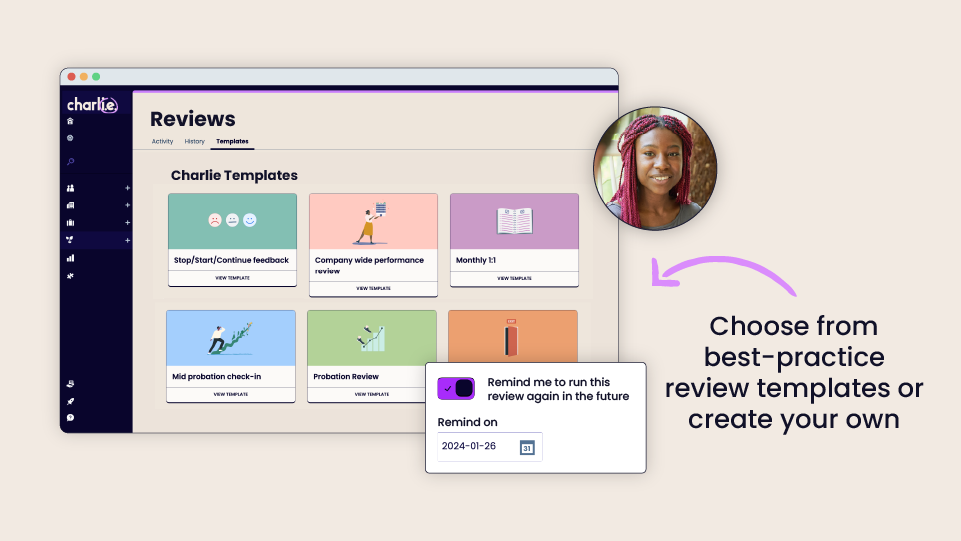
As the person responsible for HR, everything has to go via you. But Charlie takes most of that away with fully automated performance reviews, from launch to completion. Reminders and prompts are automatic, everyone gives their input at the right time, and you can tailor permissions to create reviewers and reviewees.
Integrated 360 reviews
With HR software like Charlie, you can ensure a more well-rounded and fair performance review process by integrating peer-to-peer reviews (otherwise known as 360 reviews) from other employees.
Fully templated
There’s no need to come up with questions if you don’t have the time or have run out of ideas — Charlie has templates for everything. You also have the option to tailor your own performance review questions whenever you want.
Review dashboard and reporting
With Charlie, you see everything at a glance on the dashboard — it’s always the first thing you see. So you can stay on top of what’s happening day-to-day, access performance reviews whenever you need, and easily put together reports based on real employee data.
Cons of using Charlie for performance reviews
Our aim with these guides is to give you all the information you need to make the best and most informed decision for your business so, in that spirit, these are the cons:
No complicated workflows
If you require complex workflows (multiple steps involving a wide range of HR functions) then you’ll need a tool that’s more complicated than Charlie.
Limited data reporting
Performance review reporting in Charlie is limited to who has completed their performance review, and who has not yet done it.
Costs more than DIY solutions
Charlie is a complete HR system designed for small businesses, so it’s not free. But you get more than just performance reviews — for one transparent and affordable monthly cost, all other essential HR tasks are streamlined and automated (onboarding, time off management, employee engagement etc.). You can also try Charlie for free before you commit.
Is HR software like Charlie right for small businesses?
HR software like Charlie makes it easier for small businesses to run and record performance reviews consistently and successfully. And it does this across three main areas: money, time, appearing professional.
Cost
More often than not, there isn't the budget for hiring someone to manage performance reviews, so HR software like Charlie helps you to avoid attempting them through piecemeal and scrappy processes.
Charlie’s pricing increases in step with your business — you’re only ever paying for what you need as your team expands.
Although it’s a little cost up front, using HR software for performance reviews will ultimately help you to:
- Retain and attract the right talent
- Make fairer decisions (around promotions or relevelling)
- Understand your team and how they’re performing
- Motivate your employees
With HR software like Charlie, you’re getting much more than just performance reviews and that’s a big cost saving.
Charlie’s designed to take the faff out of HR by simplifying and automating all essential tasks and admin, so you’re not trying and failing to do everything you need to without support. The software handles everything from onboarding a new team member to managing your entire team’s time off, and you can get on with running your business.
Lack of time
It’s really time consuming to put together a performance review process that works and if small businesses are short on anything, it’s time. HR software takes up the slack, as the hard work’s already been done.
It doesn’t matter if you’re the business owner, the Ops manager or even the HR manager, you’ve got more to spend your time on than performance reviews. Charlie frees you up to focus on other things.
We’ve built Charlie to be easy and intuitive, so you set up performance reviews in just three steps. After that, they’re automated by the software and regularly rolled out without you having to lift a finger. That’s a huge time (and worry) saving for you.
Looking like a proper business
One of the problems for small businesses is not looking as slick and professional as their bigger counterparts — and that can make it harder to attract good people.
Having a proper performance review system in place will boost your reputation as an employer amongst existing employees, which can only ever be a good thing when they’re your strongest advocates. Plus, you’ll send a message that there’s room for evolving in the company — often regarded as being more important than a lot of fancy benefits.
The right HR software can contribute more to your professional image than you probably first thought. And this, in turn, will help you to retain and attract the best talent.
DIY solution vs HR software: how to choose?
So now you’ve got all the information, it’s time for a bit of internal reflection.
Only you will know what’s best for your business, but if you’re still scratching your head then here are a few questions to help you find the best solution for running performance reviews:
- Will a DIY solution give me what I need right now/in six months’ time/in a year’s time?
- Is there a DIY solution that supports my business ambitions?
- Do I have the time (or inclination) to change my performance review process if the first solution doesn’t work? (In other words, am I happy with some trial and error?)
- Which solution is best for my team?
- What solution will make my life easier?
- The software sends your manIs there a performance review solution that gives me ongoing support? (We have a customer support team at Charlie, for example.)agers alerts and reminders
- What’s my budget?
And if you’re still undecided and need more information, we’ve got more free resources to help you out:

Written by:
Jenny Tattum
Jenny is a Senior Product Manager at CharlieHR. She has years of experience with product planning and development, and user research too – she put together this guide by collecting data and information on competitors so we could improve our product and tailor it to small business owners.




CharlieHR
Product Charlie Advice Charlie Recruit Pricing Charlie for CEOs, founders and MDsMarketplace
Resources
Blog Guides HR Tools Newsletter Best HR software for small business HR Support for small business Customers


© CharlieHR 2025. Charlie OS Limited is a company registered in England and Wales number 9940754